
The signal chain
The chain reads left to right:
- The inputs.
- Effects shared by both paths.
- Path A and Path B, each with effects and an amp.
- The mixer.
- Effects after the mixer.
Each card shows the block's model, an on/off switch, and the footswitch it's assigned to (FS1 to FS8, or EXP for the toe switch). The icon's color shows the kind of block:
| Kind | Color |
|---|---|
| Amps, preamps, model pack amps | Red |
| Distortion | Orange |
| Dynamics | Yellow |
| Modulation | Blue |
| Delay | Green |
| Reverb | Purple |
| Pitch | Pink |
| Wah | Cyan |
| Filter | Indigo |
| Preamp+EQ | Teal |
| Volume/Pan | Mint |
| FX Loop | Gray |
Click a card to select it and edit it in the inspector. Press Delete to clear it: an effect becomes empty and an amp becomes No Amp. KidneyHD fades blocks that are off.
A preset always has exactly 8 effect blocks, and the header counts how many are in use. An empty block shows as a dashed card; click it to choose a model. The "+" at the end of a lane moves an empty block there and opens the model picker. It never adds a ninth block.
An amp block holds the amp, its cab and the mic together, so there are no separate cab cards. The cab's name shows under the amp's name.
Moving effects
Drag an effect card to move it. Where you drop it decides where it goes. An orange bar shows where it will land.
| Drop it on | It goes |
|---|---|
| Another effect card | Just before that card |
| A lane's line | At the end of that lane |
| The space right of the Mixer | First after the mixer (or at the end, if effects are already there) |
| The Mixer tile | First after the mixer |
| The Inputs tile, or the line before the split | Before the split, shared by both paths |
| An amp card | Just before that amp |
Right-clicking an effect also gives Move To, which lists every lane.
An amp has three places, as on the pedal:
- Pre: at the end of the effects before the split, feeding both paths.
- Post: right after the mixer, before the effects that follow it.
- Paths A and B: one amp in each path. Amp B is empty until you choose a model for it.
Moving the amp
Drag Amp A to move it:
- Drop it on the input or on an effect before the split to put it in Pre.
- Drop it on the mixer or on an effect after the mixer to put it in Post.
- Drop it on a path to split the chain into Paths A and B.
Right-click Amp A (touch and hold on iPhone and iPad) for the same moves: Move Amp to Pre, Move Amp to Post and Split into Paths A & B. Leaving the paths empties Amp B, and the menu says so when Amp B holds a model. The effects stay where they are.
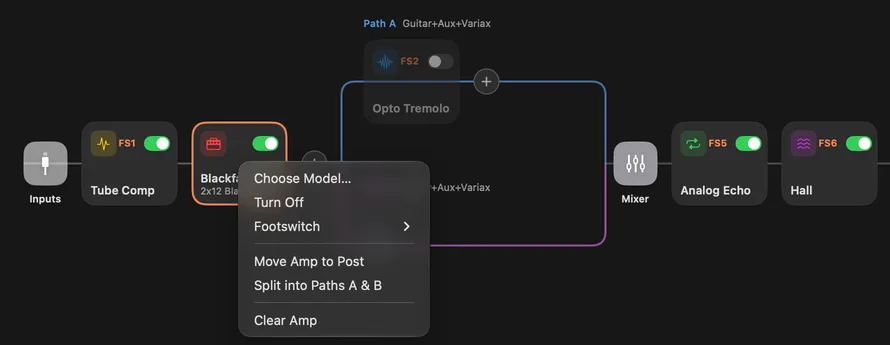
Inside a path the amp has a fixed place, and the effects sit before or after it. Dragging an amp along its own path moves those effects across it. Drop it on an effect to put the amp just before that effect, or on the path's line to put it last.