
The inspector
The inspector has three tabs: Block, Preset and Mixer.
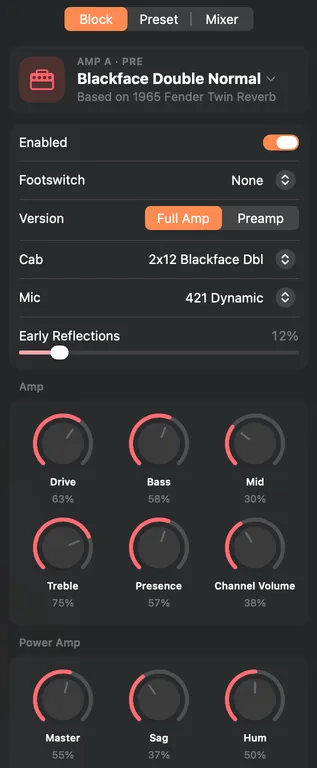
The Block tab shows the selected block:
- The model (click it to change it) and the gear it's based on.
- Enabled, and its footswitch. A block that's off still uses DSP. Clearing it to None frees more.
- Its settings, as knobs or sliders (Settings › General).
For an amp, Block also shows Full Amp or Preamp, the cab, the mic, Early Reflections, the tone controls, the power amp controls, and the cab's Low Cut, Resonance, Thump and Decay.
-
With No Cab, KidneyHD greys out the mic and Early Reflections.
-
You hear Resonance, Thump and Decay only in the Studio/Direct output mode. With Resonance at its minimum, Thump and Decay do nothing.
-
A few amps label their knobs differently, as the originals do. The note under the tone controls explains the Divide 9/15, Class A and Super O knobs.
-
Drag a knob up or right to turn it up. With a knob selected, the arrow keys step it.
-
Control-click a setting to assign it to EXP 1 or EXP 2, or to the Tweak knob on the HD Desktop. Assigned settings get an asterisk, and the Controllers section sets their heel and toe values.
-
Effects whose time or speed can follow the tempo have a Tempo Sync menu, set to Off or to a note value.
The Preset tab has the name, tempo, Trails, the two inputs, Guitar In-Z, Inputs Setup, a footswitch summary and the raw MIDI assignments.
- An amp in Pre, or an effect in Pre that's on and isn't an EQ, Wah or Volume/Pan, mixes Input 1 and Input 2 into one signal for both paths. A warning says so, or warns of a hot level when Input 2 is Same.
- When the pedal's Inputs Setup or Tempo Sync is Global, the pedal ignores the preset's inputs or tempo. KidneyHD greys them out and marks them "Global on the pedal". This also applies in Settings › Pedal and on iPhone and iPad.
The Mixer tab has the level and pan of each path. Clicking the Mixer tile in the chain opens it too.