
Settings
General
Settings › General sets:
- Where KidneyHD connects.
- The model the demo pedal acts as.
- Live edit on connect.
- Knobs or sliders.
- Your FBV controller.
Pedal
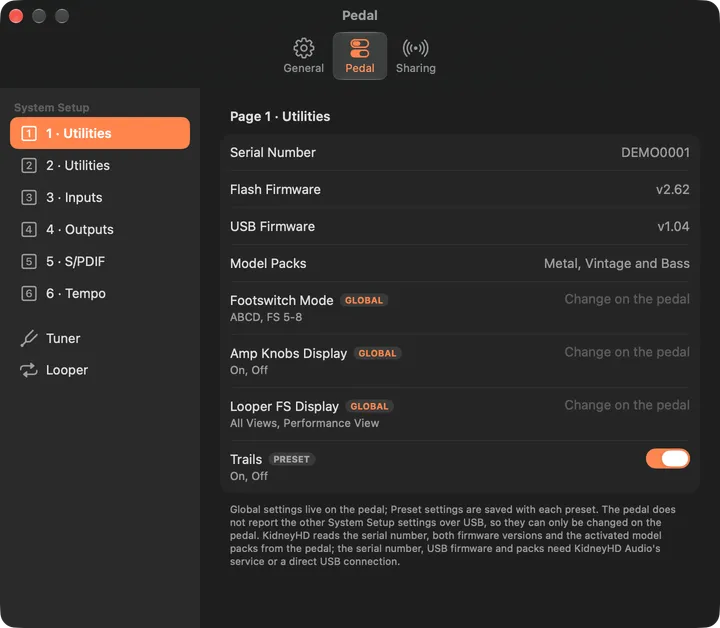
Settings › Pedal lists the pages of the pedal's own System Setup. Page 1 also shows:
- the serial number
- the flash and USB firmware versions
- the model packs activated on the pedal
Settings KidneyHD can change have a control:
- Trails, the inputs, Guitar In-Z, Tempo and the tuner reference.
- Tempo Sync and Inputs Setup. They follow the pedal when you change them there.
The HD Desktop has no Variax input, so its input menus leave out the Variax sources.
The rest say "Change on the pedal". The pedal doesn't report them over USB, so KidneyHD can't read or set them. That covers Footswitch Mode, Amp Knobs Display, Looper FS Display and Output Mode.
Sharing
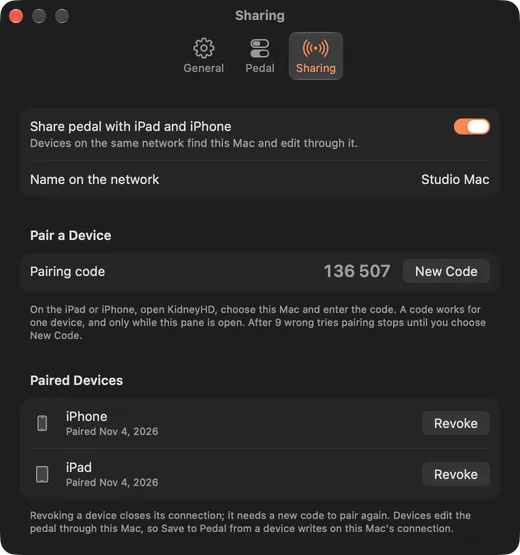
Sharing lets an iPhone or iPad edit the pedal through this Mac.
- Turn on Share pedal with iPad and iPhone.
- Keep this pane open. The six-digit pairing code only exists while it's open.
- On the iPhone or iPad, pick the Mac and enter the code.
Each code pairs one device. After three wrong tries the Mac makes a new one, and after the third code pairing stops until you choose New Code. Paired devices appear in the list, where Revoke disconnects one and makes it pair again.